
Free download · Manage portfolios
Enterprise PMO Portfolio Governance Workbook for Executive Reporting
A portfolio tracker becomes powerful when it behaves like an executive dashboard system, not a one-page spreadsheet. This workbook is designed for PMO directors, transformation leads, and agency principals managing 20 to 500+ initiatives who need one governed model, one landing page, and eight role-based reporting views.
Free download — no sign-up required.
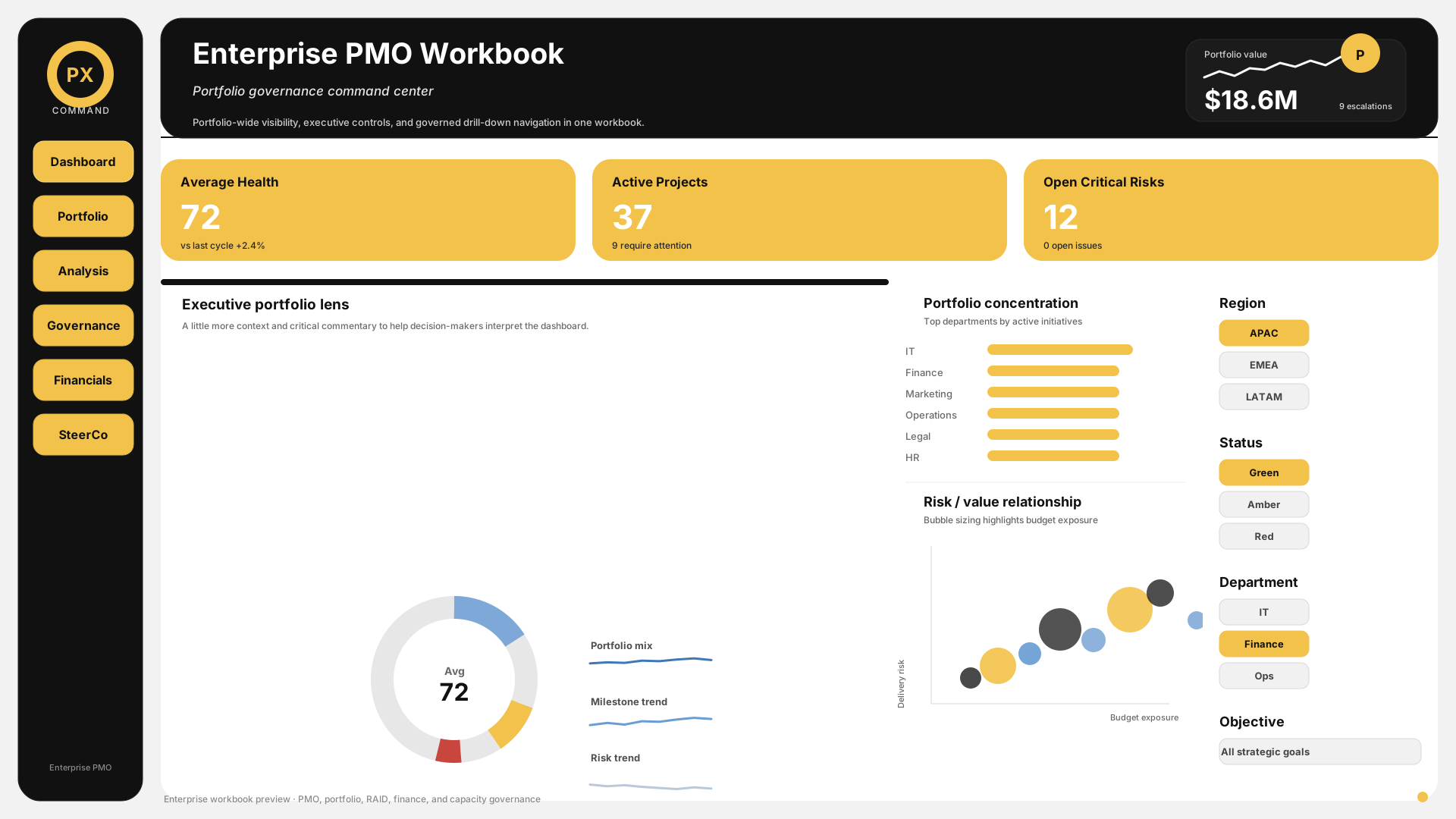
00_Landing
Command center and navigation hub for the workbook.
01_Executive_Dashboard
Board-level health, trend, and escalation view.
02_Portfolio_Tracker
Portfolio register and cross-project status oversight.
03_Project_Health
Single-project drill-down and health analysis.
What this template includes
- Landing page with workbook navigation and executive summary
- Executive dashboard with KPI cards, status distribution, and escalation focus
- Portfolio tracker with project register, RAG control, and trend signals
- Project health sheet for single-project drill-down and issue review
- Business case tracker for approval, value, and benefits visibility
- RAID dashboard for risks, issues, actions, and dependencies
- Financial tracking sheet with budget, actual, committed, and forecast views
- Resource capacity sheet with allocation, overload, and gap signals
- Steering committee reporting sheet for decisions and actions
- Normalized data model with projects, milestones, risks, issues, financials, resources, and updates
Workbook architecture
00_Landing
Command center and navigation hub for the workbook.
01_Executive_Dashboard
Board-level health, trend, and escalation view.
02_Portfolio_Tracker
Portfolio register and cross-project status oversight.
03_Project_Health
Single-project drill-down and health analysis.
04_Business_Case_Tracker
Value, approval, and benefits tracking.
05_RAID_Log_Dashboard
Risk, issue, action, and dependency control.
06_Financial_Tracking
Budget, actual, committed, and forecast analysis.
07_Resource_Capacity
Allocation, overload, and capacity signals.
08_Steering_Committee
Decision log and executive meeting pack.
When to use it
- When a PMO needs board-ready reporting without rebuilding the deck every week
- When leadership wants one source of truth across project, finance, RAID, and resource data
- When a portfolio is large enough that manual spreadsheet management is no longer reliable
- When the team needs a workbook that can be filtered by portfolio, PM, department, and objective
How to use it
- 1Load project, milestone, risk, issue, financial, and resource data into the model once, then let the workbook drive the summaries.
- 2Use the landing page as the front door and the executive dashboard as the weekly review screen.
- 3Keep RAG and scoring definitions consistent so the workbook stays trusted.
- 4Review the steering committee sheet when decisions, escalations, or approvals need to be captured formally.
- 5Refresh the workbook on a set cadence so the hidden model stays aligned with source data.
Example in practice
A PMO managing 36 initiatives across IT, Finance, Operations, and Marketing uses the workbook for weekly executive reviews. The landing page shows 22 Green, 10 Amber, and 4 Red projects. The executive dashboard highlights three projects with overdue milestones and two with critical budget variance. The RAID sheet shows a shared dependency on a delayed vendor deliverable, while the resource sheet flags two teams above 115% capacity. Instead of rebuilding slides every week, the PMO opens one workbook, filters by portfolio, and walks the steering committee directly into the exceptions that require a decision.
Common mistakes to avoid
- Building a workbook that only looks good in one static screenshot and breaks as soon as it is filtered
- Treating the dashboard as decoration instead of a governance tool
- Mixing detailed task tracking with portfolio-level reporting
- Using too many colors, chart styles, or visual gimmicks
- Keeping the workbook flat when the business needs a normalized model
Frequently asked questions
What is the difference between a portfolio tracker and a project plan?
A project plan details one project's tasks, timeline, dependencies, and resources. A portfolio tracker summarizes multiple projects at a high level for cross-project visibility, prioritization, and resource allocation decisions. The portfolio tracker is for PMO directors and executives; the project plan is for the delivery team.
How do I define RAG status criteria for a portfolio?
Green means the project is within tolerance, Amber means attention is needed, and Red means escalation is required. The key is to document the thresholds before the workbook is used.
How often should the portfolio tracker be updated?
Weekly for active portfolios. Monthly can work for slower programs, but the model should still be refreshed on a regular cadence.
How do I report portfolio health to executives without spreadsheets?
Use the executive dashboard as the reporting view. Executives want patterns, trend direction, and the few exceptions that need a decision.
Should I include completed projects in the portfolio tracker?
Keep them visible for one review cycle if the closure matters, then archive them so the active view stays focused.
How do I track multiple client projects as an agency?
Add a portfolio or client dimension and keep the model normalized so you can switch between agency-wide and client-specific views.
What is RAG status reporting and how does it work across a portfolio?
RAG is the traffic-light system used to summarize project health. In a portfolio, the distribution and movement over time matter more than any one snapshot.
Turn this template into a live workspace
Turn this workbook into a live PMO command center. Praxiox ingests project, risk, finance, and resource data once, then refreshes the reporting views your executives rely on.
No credit card. Cancel anytime.